
End to end encrypted team communication for industry: a customer case with Tuwunel

Executive summary
An Austrian industrial SME engaged us to replace its SaaS team messaging with a communication platform hosted on its own hardware and encrypted from device to device. The solution uses the open Matrix standard with the Tuwunel homeserver, written in Rust. Its chat services are reachable exclusively through the customer's private VPN
This anonymised case study describes the deployment and its acceptance checks as of 3 November 2026
| Aspect | Detail |
|---|---|
| Scope | Internal team communication for 20 users, in the office and on mobile devices |
| Platform | Tuwunel homeserver, Rust, embedded RocksDB, one container for the homeserver |
| Clients | Element Web, Element Desktop and Element X for iOS and Android |
| Infrastructure | Debian 13 VM on the customer's own KVM host, with 2 vCPU, 4 GB RAM and 40 GB disk |
| Network access | Private mesh VPN through Tailscale, with no publicly reachable chat ports |
| Encryption | End to end encryption for team messages and attachments, plus TLS between clients and the reverse proxy |
| Backup strategy | Nightly backups, encrypted before transfer to Swiss object storage, with a verified restore |
| Implementation | A few working days, including a pilot phase and disaster recovery verification |
Initial situation and objectives
The customer integrates OT and IT systems for manufacturers and extraction sites. Daily conversations include network diagrams, controller configurations, interface specifications and maintenance windows. These are details that its own customers entrust to it when handing over access to production systems
The concern was who could decrypt those conversations. Slack and Microsoft Teams encrypt data in transit and at rest, but ordinary team chat does not have end to end encryption that keeps the service itself outside the trust boundary. Teams offers E2EE for supported calls and meetings, which does not extend that protection to their chat messages
For this customer, control of the chat server alone was insufficient. Message content also needed to remain unreadable to the server
The requirements were concrete:
- End to end encryption by default for team messages and shared files
- Hosting on the customer's own hardware, without a chat vendor's cloud backend
- Familiar daily use, with rooms, threads, reactions, file sharing and desktop and mobile apps
- Access through a private network, without publishing the chat services on the internet
- A small operational footprint, manageable by a team of four
- Encrypted backups and a demonstrated restore, with the limitations of key recovery made clear
Evaluation of alternatives
Among the options we assessed, Matrix with Tuwunel offered the best fit for this combination of encryption, familiar clients and a small deployment. This was a decision for the customer's operating model, rather than a claim that one platform suits every organisation
The comparison below concerns message content in team chat. It distinguishes encryption controlled by the service from encryption whose usable keys stay with the participants
| Option | Own hosting | E2EE for chat | Assessment for this project |
|---|---|---|---|
| Slack, Microsoft Teams | No | No for ordinary team chat | Service managed encryption did not meet the requirement |
| Zulip | Yes | No between participants | Strong topic organisation, but the server processes readable messages |
| Mattermost | Yes | Not built in | Capable team chat, with readable content available to the server |
| Rocket.Chat | Yes | Private rooms and direct messages | E2EE is available, but its scope and security history required closer assessment |
| Wire | Yes | Yes | An encrypted alternative with more backend services to operate |
| Matrix with Synapse | Yes | Yes, through clients | Mature server, normally operated with a separate PostgreSQL database |
| Matrix with Tuwunel | Yes | Yes, through clients | Selected for one homeserver container, an embedded database and the required Element workflows |
The comparison draws on the published documentation for Zulip, Mattermost, Rocket.Chat, Wire and Synapse
A security analysis published at ACSAC 2025 identified flaws in the Rocket.Chat E2EE protocol and implementation. The researchers' disclosure page also states that critical findings have been patched. The paper is relevant to an assessment of specific versions, not evidence that every current Rocket.Chat deployment remains vulnerable
Tuwunel is the official successor to conduwuit. According to the project, its principal sponsor is the Swiss government, where it is also deployed for citizens. The project describes broad Matrix compatibility, while acknowledging exceptions for specialised use cases
For this deployment, Element Web, Element Desktop and Element X covered the required messaging workflows without client modifications. Tuwunel runs as a single process with embedded RocksDB, so the customer does not need to operate a separate database service
Solution architecture
The chat services run in one small virtual machine on the customer's KVM host. Approved laptops and phones connect through Tailscale, then use HTTPS to reach Caddy. Caddy forwards Matrix requests to Tuwunel and serves the Element web client
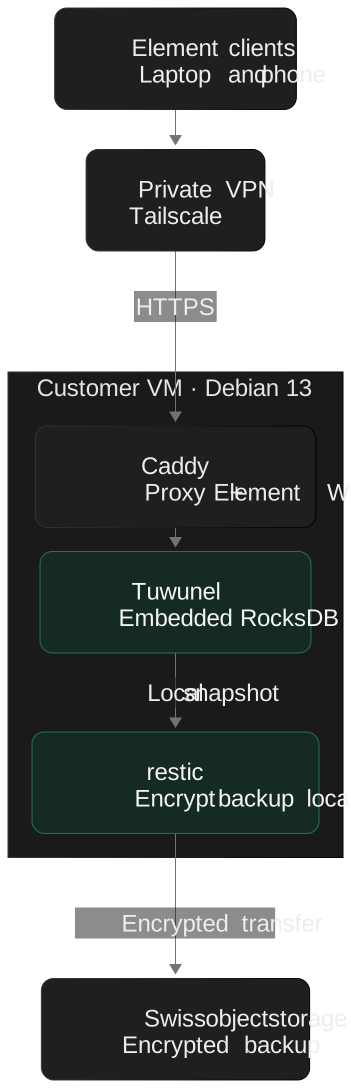
Caddy obtains certificates through a DNS challenge, which does not require a publicly reachable web port. A small discovery response on the company website directs Matrix clients to the private chat address, allowing users to enter the company domain when signing in
That discovery response is public and reveals the chat hostname. Access to the chat service still requires an authorised VPN connection
The chat backend runs on company hardware, but the deployment is not disconnected from external services. Tailscale coordination, DNS and certificate services, software updates, mobile push services and the encrypted backup destination remain external dependencies. Tailscale documents this distinction between its control and data planes
Security architecture
The design combines private network access with encryption on the user devices. Each layer addresses a different failure scenario
| Layer | Measure | Risk addressed |
|---|---|---|
| Message content | E2EE enabled in every room used for team communication, with messages and attachments encrypted on the clients | Reading stored content from a copied server database or backup without the users' keys |
| Device trust | New devices verified through emoji comparison or the user's recovery key | Sharing message keys with an unrecognised device |
| Network | Chat services reachable only over the private VPN, with no public chat listener | Direct internet scans and attacks against the chat endpoints |
| Transport | HTTPS between clients and Caddy, with certificates issued through a DNS challenge | Eavesdropping on the client connection |
| Accounts | Federation disabled, registration controlled through onboarding tokens and closed after onboarding | Unauthorised account creation and communication with external Matrix servers |
| Administration | SSH keys, disabled root login and automatic security updates | Password guessing and avoidable exposure to known software vulnerabilities |
| Containers | Homeserver runs as an unprivileged user, with privilege escalation blocked | Excessive privileges if the application is compromised |
Matrix encryption takes place in the clients. Room membership and other metadata remain visible to the server. Encrypted key backups can also be stored there, but the server does not receive the user's recovery key needed to unlock them
For a lost device, the response starts by revoking its VPN access and terminating its chat session from a trusted device. This stops further authorised access once revocation takes effect. It cannot erase messages or keys already stored on the lost device, so device encryption and screen locking remain necessary
E2EE also does not protect a compromised user device. A compromised server that serves the web client could deliver altered client code, which makes the integrity of the web client and timely updates part of the security model
Backup and disaster recovery
Backups run nightly and are encrypted before leaving the server. A complete restore was successfully verified before the system entered daily use
The nightly procedure is deliberately simple:
- The homeserver stops briefly while its database is copied locally to obtain a consistent snapshot
- The homeserver resumes, with the short interruption scheduled for 03:00
- The snapshot and configuration are encrypted and deduplicated with restic, then transferred to Swiss object storage
- Retention is applied automatically: 7 daily, 4 weekly and 6 monthly snapshots
- An integrity check reads a sample of the stored data
There are two separate encryption layers. Message content in the database is already encrypted by the Matrix clients. Restic adds encryption for the backed up database, configuration and metadata before upload
Recovery credentials for the backup are retained separately from the VM so a server loss does not also remove the ability to restore it. The automated backup job still needs access to its backup credentials, which must be protected on the running system
Restoring the server and recovering a user's message keys are different operations. Each user keeps a personal recovery key in a password manager. A server restore alone does not grant an administrator access to the encrypted conversations
Rollout and daily operation
Onboarding took approximately ten minutes per person. Each team member followed the same sequence:
- Install the VPN app on laptop and phone, then sign in
- Create an account in the branded web client using an onboarding token
- Configure secure key backup and save the personal recovery key in a password manager
- Install Element X on the phone, sign in and verify it from the laptop
Users enter the company domain when signing in. The discovery response on the company website supplies the chat address, while the VPN provides access to it
The workspace is organised as one private Space with rooms for projects and topics. Threads, reactions, mentions and file sharing provide familiar workflows. Mobile push services signal new activity without receiving decrypted message content, and the app needs access through the VPN to retrieve and decrypt messages
Known limitations
Encryption protects message content, while the deployment still needs clear rules for metadata, devices, recovery and integrations
| Limitation | Impact | Approach in this deployment |
|---|---|---|
| Metadata | The server sees room membership, message timing and sizes | Keep the server private and under the customer's administration |
| Message search | The server cannot search encrypted message content | Use local indexing in Element Desktop, with more limited web and mobile search |
| Sign in by QR code | This workflow was unavailable with the deployed server and client combination | Sign in manually and verify the device, adding roughly 30 seconds |
| Recovery keys | Losing all devices and the recovery key can make earlier history inaccessible | Store the recovery key in the user's password manager during onboarding |
| Integrations | A simple webhook does not provide an encrypted Matrix participant | Use a bot that supports E2EE and has its own device keys |
| VPN access | Every device needs VPN access, and external partners cannot join directly | Keep this workspace internal and design partner access separately |
| External services | VPN coordination, certificates, push delivery and remote storage still have dependencies | Include them in operational planning rather than treating the system as isolated |
| Changing server software | Keeping all data when moving to a different implementation is not guaranteed | Assess supported migration paths before choosing a replacement |
Element documents local search in its desktop client. Other client capabilities can change between versions, so search and sign in behaviour should be checked when updating
Outcome and relevance for industry
The customer's internal chat now runs on infrastructure it controls. Messages and attachments are encrypted on the participants' devices, and the chat backend is not publicly reachable. The engagement took a few working days and requires one small virtual machine in ongoing operation
- Control of operational data: the primary chat database stays on company hardware, with encrypted recovery copies in Swiss storage
- Private access: chat endpoints are available only through the authorised VPN
- Verified recovery: nightly encrypted backups and a completed restore check before rollout
- Familiar applications: users work in web, desktop and mobile clients with established messaging workflows
- No chat licence fees for the selected software: infrastructure, storage, VPN services and maintenance remain operating costs
Plants, engineering firms and suppliers exchange network plans, machine parameters and maintenance information every day. A deployment of this kind can keep those conversations within infrastructure they administer
For a plant environment, the server should sit in an appropriate IT zone with controlled access, preserving the separation from control systems. An E2EE capable bot can deliver machine alerts or shift handover notes to dedicated rooms. Such integration needs its own access design and was not part of this deployment
Sources
The project scope, resource allocation, rollout duration and restore result describe this customer engagement. The following sources support the platform and security background
- Tuwunel project, architecture and migration information
- Matrix encryption implementation guide
- Slack security and encryption
- Microsoft Teams encryption
- Zulip security and Mattermost encryption options
- Rocket.Chat encryption configuration
- Rocket.Chat security analysis, ACSAC 2025 and the researchers' disclosure and patch information
- Wire architecture and Synapse with PostgreSQL
- Caddy certificate automation and DNS validation
- Tailscale control and data planes
- Restic repository design and encryption
- Element support and search limitations